Help Center
Home
Help Center
Home
Learning center
Welcome to the learning center
Release notes
Release notes - Workflow and reporting
Workflow and reporting version 6.0.0 - Coming soon!
Workflow and reporting version 5.0.0 - Oct. 12, 2025
Workflow and reporting version 4.0.0 - Sep. 17, 2025
Workflow and reporting version 3.0.0 - Aug. 1, 2025
Workflow and reporting version 2.0.1 - Jul. 11, 2025
Release notes - Viewer
Viewer version 2.4.0 - Coming soon!
Viewer version 2.3.0 - Oct. 12, 2025
Viewer version 2.1.0 - Aug. 1, 2025
Viewer version 2.0.0 - Jul. 11, 2025
Release notes - AI
AI version 2.0.0 - Jul. 11, 2025
Report Assistant 3.0
Report Assistant 3.1
Report Assistant 3.2
Report Assistant 3.3
Service bulletin
Inflight tab tips - Sep. 1, 2025
Keyboard shortcuts
Exam list and reporting
Image viewing
Hardware and software
Hardware recommendations
Supported monitor configuration
Network requirements
Chrome settings and plug-ins
Browser support and compatibility policy
Elimination of competing applications
Training and testing
Reading physician overview
Physician overview
Reading efficiency best practices
Reading efficiency best practices
Breast reading
Breast reading
Profile
How to access your profile
Setting your landing page
Resetting your password
Exam list
Exam List: Learn the basics
Customize columns
Adjust column width
Search by column
Sort column
Filter the exam list
Create a preset filter
Apply or clear a preset filter
Edit or delete a preset filter
Exam actions
Reporting
Reporting: Learn the basics
Exam information
Linked exams
Technologist and operational notes
Exam list panel
Filter exam list panel
Upload prior images and reports
View images and reports from the exam list panel
Exam actions (reporting)
Add billing
Consult request
Download images
Support
Templates and macros
Templates
Macros
Peer review
Creating a peer review when viewing completed reports
Creating a peer review on comparison reports
Acknowledging and editing peer reviews from the peer review tab
Peer review supervisor workflow
Assigning focused peer reviews
Tags and tasks
Administrative setup for tags and tasks
Access tags and tasks from the exam list or reporting screen
Tags: Adding, editing, and deleting
Tasks: Adding, editing, and deleting
Viewing all notes from the exams tab
Filtering exams by tags and tasks
The tasks tab
Filtering the tasks tab
Image viewing
Accessing the viewer’s electronic labeling (eIFU)
Getting started
Selecting the default viewer
Basic orientation
Basic orientation to viewports
Orientation to viewports (single landscape monitor)
Orientation to viewports (dual landscape monitors)
Orientation to viewports (single landscape monitor + dual portrait monitors)
Common mouse functions
Single vs. Comparison panels
Image, Key Images, and 3D panels
Navigating between exams
Tools
The toolbox
Thumbnails
Selecting key images
Hanging protocols
Accessing your hanging protocol settings
Default settings, subscribing to System Default settings, copying from other readers
Technologist workflows
Add, edit and delete forms within an exam
Adding and viewing notes
Preset filters: Create, edit, delete
Delete an exam
Submit an exam for read
Linking exams
Submitting a support request
Resolving a support request
Upload documents to an exam
Audit Trail: Viewing and exporting
Administrator workflows
Exam processing rules
Building and managing forms
Accessing Form Builder
Form settings
Managing facility's/facility groups
Add a department to a facility
Add/delete facility directory contacts
Adding groups and facilities
PDF report set up
Update department information and report settings
Managing reading physician accounts
Add facilities for reading physicians
Add licenses
Add mnemonics
Add privileges
Adjusting reading physician's queue depth
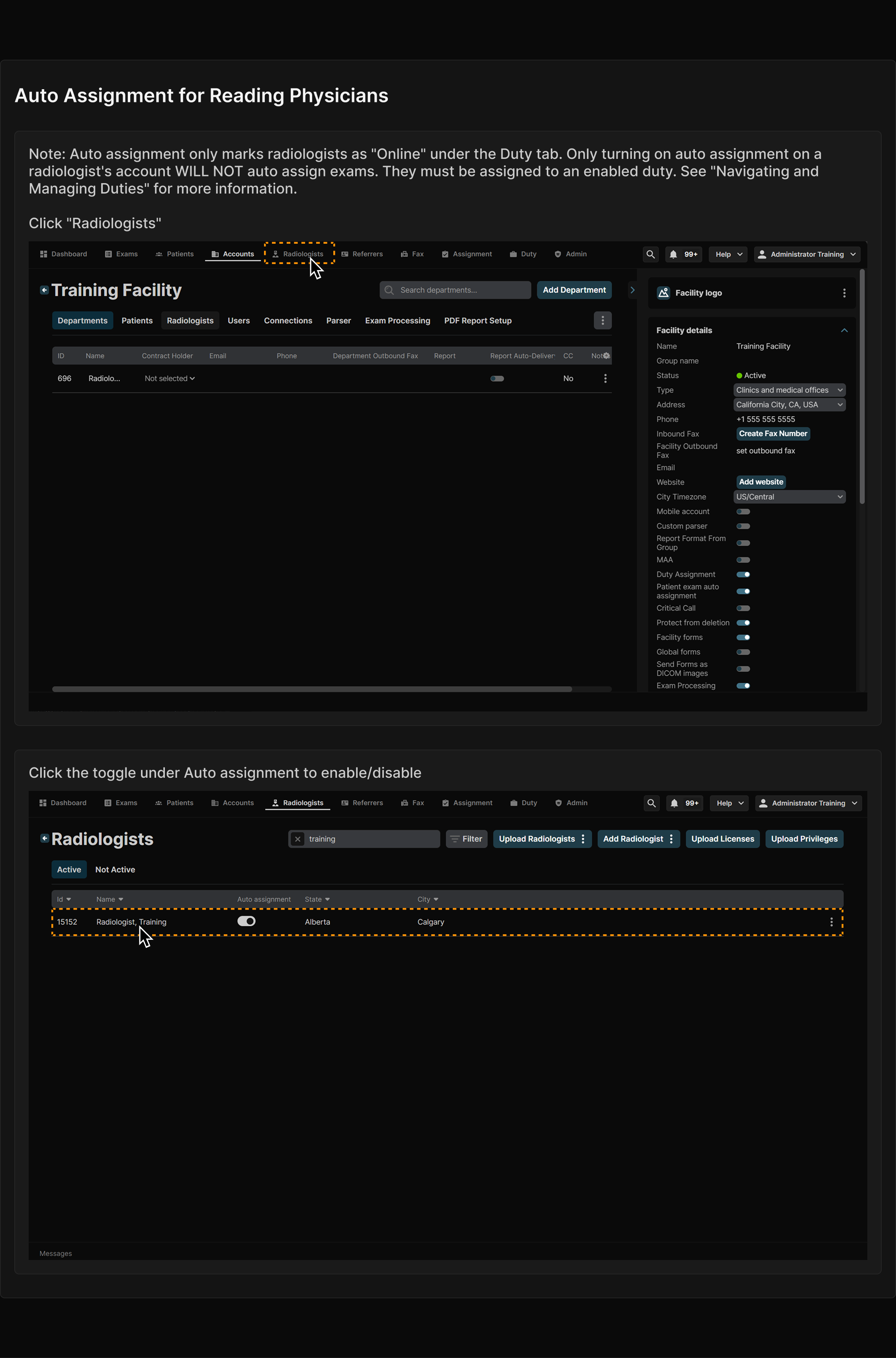
Auto assignment for reading physicians
Create/configure preset filters
Physician reading access for a facility
Reading physician testing
Exam list and reporting test
Image viewing test
Breast reading test
Technologist testing
Basic user training (Technologist)
Administrator testing
Basic user training (Administrator)
Auto assignment for reading physicians